Draftly - WYSIWYG Markdown
A modern, intuitive Markdown editor built on the powerful CodeMirror 6 framework, designed to bring a truly What You See Is What You Get experience.

17th Jan, 2026
14th Feb, 2026
4 min read
Li-Fi
Arduino
Half-Duplex Mode
I’m a big fan of Obsidian, especially its editor. The WYSIWYG Markdown experience it provides is elegant, minimal, and fast. It stays out of your way. No excessive settings, no overwhelming toolbars. Just a smooth and focused writing environment. That kind of clean experience is surprisingly rare in most editors.
Obsidian’s editor is built on HyperMD, a remarkably powerful Markdown engine. It supports plugins, themes, and GitHub Flavoured Markdown, all wrapped in a thoughtful user experience. For a long time, HyperMD was the obvious choice if you wanted a rich Markdown editor.
But it has now been eight years, and the project is no longer maintained. It was built on CodeMirror 5, while CodeMirror 6 represents a complete architectural rewrite. The ecosystem has moved forward, and HyperMD has effectively been left behind.
That gap is why I built Draftly.
What is Draftly?
Draftly is a modern WYSIWYG Markdown editor built on CodeMirror 6, designed with current standards and long-term sustainability in mind. It brings everything HyperMD offered, but smoother, faster, and cleaner. It is framework agnostic, lightweight, and built around a simple, extensible plugin architecture.
It also includes a preview renderer that generates HTML and CSS, ensuring visual consistency between the editor and static output.
Draftly is my attempt to carry forward what made HyperMD great, while rebuilding it for today’s web.
Why Draftly?
- 🚀 Modern Architecture: Built on CodeMirror 6 with incremental Lezer parsing.
- 🎨 Rich Editing: WYSIWYG-like experience with full markdown control.
- 🔌 Extensible Plugin System: Add custom rendering, keymaps, and syntax.
- 🖼️ Static Preview: Render markdown to semantic HTML with visual parity.
- 🌗 Theming: First-class support for light and dark modes.
- 📦 Modular Exports: Import only what you need (
draftly/editor,draftly/preview,draftly/plugins).
Installation
Install the package via npm:
NPM
npm install draftlyPeer Dependencies
Draftly requires the following CodeMirror 6 peer dependencies:
PEER DEPS
npm install @codemirror/commands @codemirror/lang-markdown @codemirror/language @codemirror/language-data @codemirror/state @codemirror/viewMinimal Setup
The draftly() function returns a CodeMirror extension bundle. Drop it into any EditorView:
MAIN.TS
import { EditorView } from "@codemirror/view";
import { EditorState } from "@codemirror/state";
import { draftly } from "draftly/editor";
import { allPlugins } from "draftly/plugins";

const view = new EditorView({
  state: EditorState.create({
    doc: "# Hello, Draftly!",
    extensions: [draftly({ plugins: allPlugins })],
  }),
  parent: document.getElementById("editor")!,
});
This is all you need to get a rich editor up and running.
Architecture Overview
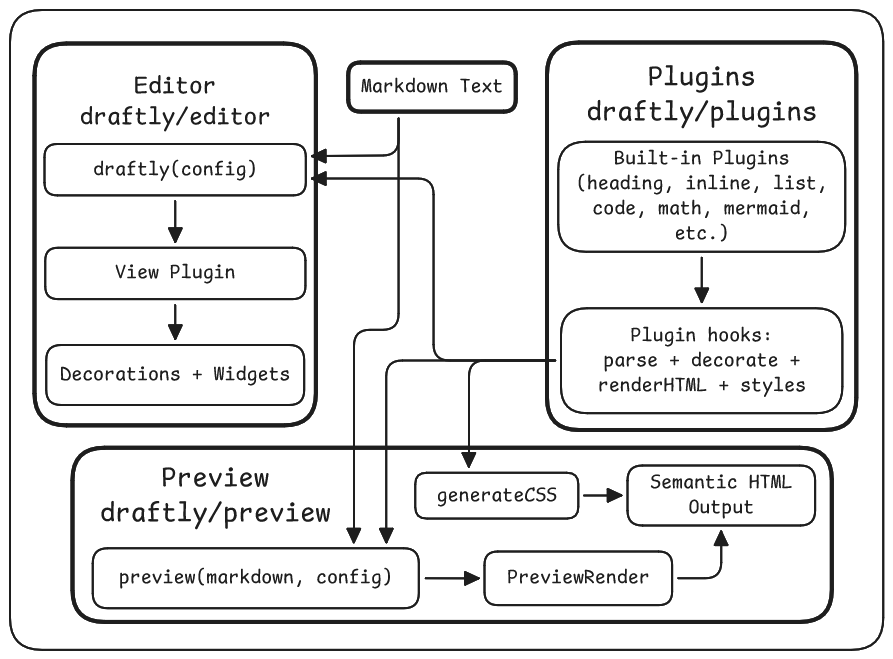
Draftly is built on a clean, layered architecture:
Key Design Patterns:
- Plugin Architecture - All features are encapsulated in plugins with clear interfaces
- Cursor-Aware Rendering - Syntax markers are hidden when the cursor is away; revealed when editing
- Widget Decorations - Complex elements (images, math, mermaid, checkboxes) are rendered via CodeMirror widgets
- Preview Parity - The same plugins that decorate the editor also render the static HTML preview
Static Preview (Server-Side Rendering)
Draftly's preview module renders Markdown to semantic HTML - perfect for server-side rendering, export, or static site generation.
PREVIEW-EXAMPLE.TS
import { preview } from "draftly/preview";
import { allPlugins } from "draftly/plugins";

const html = await preview("# Hello World\n\nSome **bold** text.", {
  plugins: allPlugins,
  wrapperClass: "draftly-preview",
  wrapperTag: "article",
  sanitize: true,
  theme: "auto",
});

console.log(html);

<article class="draftly-preview">
  <div class="cm-draftly-line-h1"><h1 class="cm-draftly-h1">Hello World</h1></div>
  <p class="cm-draftly-paragraph">Some <span class="cm-draftly-strong">bold</span> text.</p>
</article>
Render Markdown to HTML on the server.
Generating CSS
Use generateCSS() to extract all plugin styles for the preview:
CSS-GEN.TS
import { generateCSS } from "draftly/preview";
import { allPlugins } from "draftly/plugins";

const css = generateCSS({
  plugins: allPlugins,
  theme: "auto",
  wrapperClass: "draftly-preview",
  includeBase: true,
});
Conclusion
Draftly is still growing. It is not trying to be everything. It is trying to be focused.
The goal is simple: preserve the power and honesty of Markdown while removing the friction between writing and seeing. No bloated toolbars. No heavy abstraction. Just clean text, intelligently rendered.
I built Draftly because I needed it. A modern foundation. A maintained architecture. A system that respects both developers and writers.
If you are building a documentation platform, a knowledge tool, a note-taking app, or anything that lives on Markdown, Draftly is meant to fit naturally into that workflow. And if you care about clean architecture and extensibility, you will probably enjoy looking under the hood.
This project is open, evolving, and shaped by feedback. If you try it and find something that can be improved, that is not a flaw. That is an invitation.
Markdown has survived for a reason. It is simple. Honest. Durable.
Draftly is just my attempt to make it feel a little more alive.